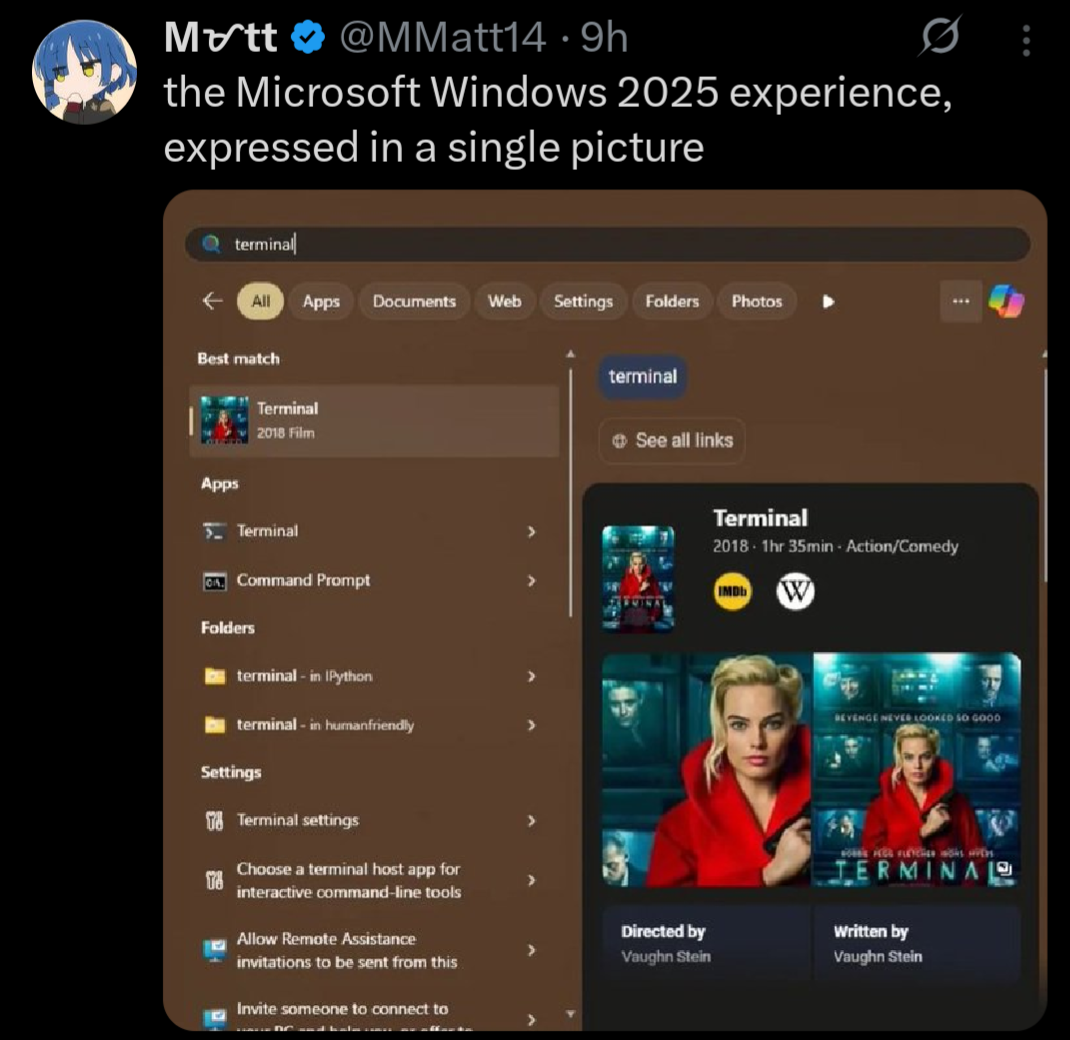
Stop trying to use your computer and get back to consuming damn it. Why are users so difficult!
Seriously, has no one thought of the shareholders!??!
I remember how the startmenu didnt suck on windows 7 and just worked. Good times. That was also the last time where you could find most of the options in one place.
Like in 2015 i was weirded out how a multibillion dollar company wasnt able to just make a new app for settings with feature parity to the old thing for their major new OS release. 10 years later: lmao.
They can do whatever they want, it’ll be without me.
I’m not saying that my Linux installation was super easy to set up, but once set up, I’ve had fewer problems than Windows.
I for one do miss my system restarting in the middle of some work to apply an update.
You can do that in Linux too! Just put an entry in crontab to reboot the system sometime during your working hours.
thanks, i’ve been missing that feauture.
I just installed Linux the other week and it WAS super easy to set up for me. I was really surprised but everything just worked
The hardest part was getting my Windows-only games to play properly in Linux. Rocket League was relatively easy, but Skyrim was a real pain to get working. But now that Skyrim is working, it strangely feels either the same or slightly better than it does in Windows.
That’s been my experience too. I’ve been pleasantly surprised by how easy it is to game on Linux. There have been some games where I had some issues, but the same could be said for Windows too. I think the gaming specific aspect is roughly equal between the two operating systems.
The nice thing about Linux though is that when it does go wrong, I am better equipped with the information and tools to be able to effectively troubleshoot and fix the problem. At least, in theory — I am still learning, so I often find myself wading through logs that I don’t understand, with little progress. It does at least feel more empowering though, to have the abstract option of being able to fix my problem, even if I am not able to grasp that opportunity in practice.
Easier than installing and setting up Windows in my experience
Unrelated to that exact image but I’m gonna rant about other windows shit because I feel like it.
Windows decided my page file needed to be 80 GB. I do not want it to be 90 GB. I go to the start menu and search up “page file” to see if there’s a settings menu. First result is a random file in an application’s directory that can’t be opened/displayed by any program on my PC, then a list of other unrelated files.
So I open Control Panel, hoping to find it where I did before, and I click on
System. What do you know, that menu no longer exists, and redirects to Windows Settings. Where do I go from here? Maybe the giantInstalled RAMsection because the page file is just a (overly simplified) method of extending your memory to your disk? No, of course not, that menu’s not actually a menu, it’s just a stat counter.Instead, I have to go to Device Specifications, then the section titled
Related links, then clickAdvanced system settings. Oh whaddaya know? Now I’m in the settings menu that used to be behind the originalSystemoption in Control Panel!Now I’m in the Advanced tab of that menu. But where do I go from here? That’s right,
Performance Options, and then anotherAdvancedtab!!!Then I have to click the
Changebutton, where Windows has… conveniently enabledSystem managed sizeso it could choose to set my page file to 80 GB.I edit, it, hit
Ok, have to hitApplyin the other menu too, have to close out the no-longer-needed Settings and Control Panel windows that only served as a maze to get me here in the first place, and THEN I can restart my computer to reduce the size of the page file, even though it is currently not in use by any program, and all data is in RAM, and the file could reasonably be shrunk by the system at any time.After the restart, this process begins all over again, because this is my third attempt, and Windows automatically reverts back to managing the size itself, and sets it to 80 GB. I have 5 GB of storage space left on my disk.
The descent into advanced Advanced menus really is the cherry on top of this shit muffin.
As I say, when you’re hunting around for something in Windows and you come across a dialog box that came straight from Windows XP… you’re getting close.
deleted by creator
I empathize with this slightly non-ideal situation.
But can you imagine how insane it would be if you were told to do something like copy/paste
swapoff /swap && truncate -s 8G /swap && swapon /swapinto a terminal? TEXT? Like a caveman? The horror! The heresy! How can anyone be expected to do something so complicated! This is entirely unreasonable UX and the reason why Linux is straight up unusable.Btw here’s 15 bazillion commands in a
.psto perhaps disable some of the ads in your start menu until the next time your computer reboots.I agree with the sentiment, and it would definitely make a lot of troubleshooting easier, but you do gotta remember that 99% of people are so non-technical they won’t read anything going into their terminal, or if they do, they won’t know what it means.
You could just as easily replace that with
sudo rm -rf /*and they’d run it just as quickly, and that’s my worry.IMO we should just have settings menus alongside commands for most things any normal user might have to encounter, since that’s just a more user-friendly interface in terms of preventing accidental bad command execution and also just letting people find things on their own without having to look up a command every time if they don’t want to learn a short book’s worth of terminal commands.
The kind of person who blindly runs commands also blindly runs any .exe or .bat they download from github which is not any better.
Of course in an ideal world there’d be a perfect GUI for everything, and we’ve gotten a lot better at that in the last few years. But it’s not like windows is lacking in things that are only configurable through CLI or the registry (which is even more opaque). I’m not saying Linux is perfect, just pointing out the hypocrisy.
While true, copying and pasting is much easier to exploit, especially since websites can alter your clipboard. Not to mention that people are already more wary of downloadable executables, but less so for commands.
For example, I’m not sure if you saw the newer attack vector a lot of scammers are using, but essentially they’ll have a 3-step process saying “Press Win + R” and “Press Ctrl + V” then “Hit Enter”, as a fake captcha, and the site automatically copies a malicious command to their clipboard, which then gets run when they paste.
A similar attack vector could take place where a user copies a command that looks legitimate, hits paste and enter, and only then is it clear that the site copied a new command to their clipboard that isn’t the one on the site they thought they checked.
I do agree that Windows is still pretty shit in this regard though. I just think we should seek to not emulate that as a requirement for users to edit certain settings if we can help it :)
The attack vector of convincing users to do stuff exists regardless of whether a niche GUI exists somewhere to do <the thing>. The only proper defense against social engineering is a) training and b) following the least privilege principle (which neither Windows or traditional Linux desktop’s permission model properly, as the current user in either case has full permissions to retrieve extremely sensitive credentials such as browser cookies without interaction).

Trying to defend against this from the perspective of de-normalizing the CLI is like defending against drunk driving by adding a bittering agent to Guiness beer exclusively.
As for clipboard highjacking, I am well aware, which is why any decent modern terminal emulator should a) strip escape codes by default and b) support bracketed-paste, to prevent immediate execution of a pasted command. If yours does not, please consider switching to a safer alternative (such as kitty).
IMO we should just have settings menus alongside commands for most things any normal user might have to encounter, since that’s just a more user-friendly interface in terms of preventing accidental bad command execution and also just letting people find things on their own without having to look up a command every time if they don’t want to learn a short book’s worth of terminal commands.
THIS. As a lifelong Windows user I’d rather deal with layers of shitty GUI, than having to memorise terminal commands and always pay attention not to mistype them lest I fuck my system up.
I can’t switch to Linux yet due to lack of support from my essential programs, but even if it wasn’t for those, I’d still be annoyed if I had to use a terminal to change settings in my system.
IMO we should just have settings menus alongside commands for most things
So like KDE
All this yes. If you’re actually looking for help, you have to also click “set” after changing the page file settings.
Would you recommend MS make it easy for idiots to fuck with the page file?
Yes?
If my page file is set to 80 GB by default but isn’t being used by applications because my actual RAM utilization is always under 80%, and they have a dedicated settings menu for it, you’d think they could make getting to that settings menu not take a minimum of 8 separate clicks (assuming you have memorized exactly where to go from the start, and never click the wrong button or link), 4 separate menus, 2 nested “Advanced” menus, and multiple fields and checkboxes to tick off and edit after all of that, just to say “Use less of my disk for the page file”. This could literally be a slider in Settings.
The page file doesn’t cause major system instability if you adjust its size, unless you’re constantly using much more RAM than your system has, and the page file is manually set extremely small.
It just helps keep your system more stable by offloading excess data that can’t be stored in RAM to your disk. My entire computer, even under heavy load, never needs more then 2-5 GB of space on top of my RAM, and that’s when I’m running games at max settings, my browser with 40 tabs open, and multiple instances of 3D design software in the background, hardly a common enough occurrence for Windows to justify going “eh, maybe they’ll actually need 80 GB, you never know”, and never letting me change it even after I restart.
Swap is also used to offload data in RAM that’s used infrequently to instead prioritise caching data that doesn’t need to be in RAM but is nevertheless used more frequently.
If you’re playing Dark Souls and have a web browser open in the background, each time you die the game may need to re-load some level data or assets from disk (e.g. they relate to the area you respawn in, but not where you keep dying). If the computer can instead keep those in RAM, you can respawn faster. If it has to put Chrome on disk that may be a worthwhile tradeoff.
The Windows start menu is completely useless now. I know they pushed using the search to find apps, but I never used it that way except as a last resort.
I’ve been on Mint for just over a year, now. I’ll never go back.
I know this is the wrong audience, but you can type cmd into explorer and it will launch a terminal in that directory (I think this works with any command in your path)
I’m more of a shift-right click > PowerShell kind of person, but this is good to know
Indeed. Also, tried this when I saw it and was surprised that, not only did the Terminal app show up first, but I saw no ads in the start menu at all. Turns out the settings I set on my Windows 11 partition back in 2022 are still there, and I just don’t see stuff like this.
Like yes, I prefer Linux and wish Windows 11 didn’t have so much crap like this, but… It’s so easy to turn most of it off and move on. Changed them once when I set up this machine and haven’t touched them since. Maybe I’m lucky, but I never had an update change back settings, either.
this is actually incredible, thanks
Another option: use windows+r and type the exact name of the executable, the first time, and then it will remember it next time.
Also, can right click on the start menu and then click terminal
I’m hearing a lotta bitchin’ about Windows and not enough uninstalling.
survivorship bias - those who have uninstalled, are not bitching about windows anymore
Certainly it looks like your trying to post a meme on Lemmy 👍🔥 Do you need help with that? Here’s my top memes brought to you by Raid Of Warfare get the new frog togs skin only $4.99.
Would you like to open this in edge? 💪🤔
Would you like to open this in edge? 💪🤔
I spent time over the holidays setting up edge on a relative’s laptop.
One where I could’t enable the play store.
Long story short, he has to run two bash scripts and can use it through a VM with debian 12 with KDE, because I tried to install wine on there last year.
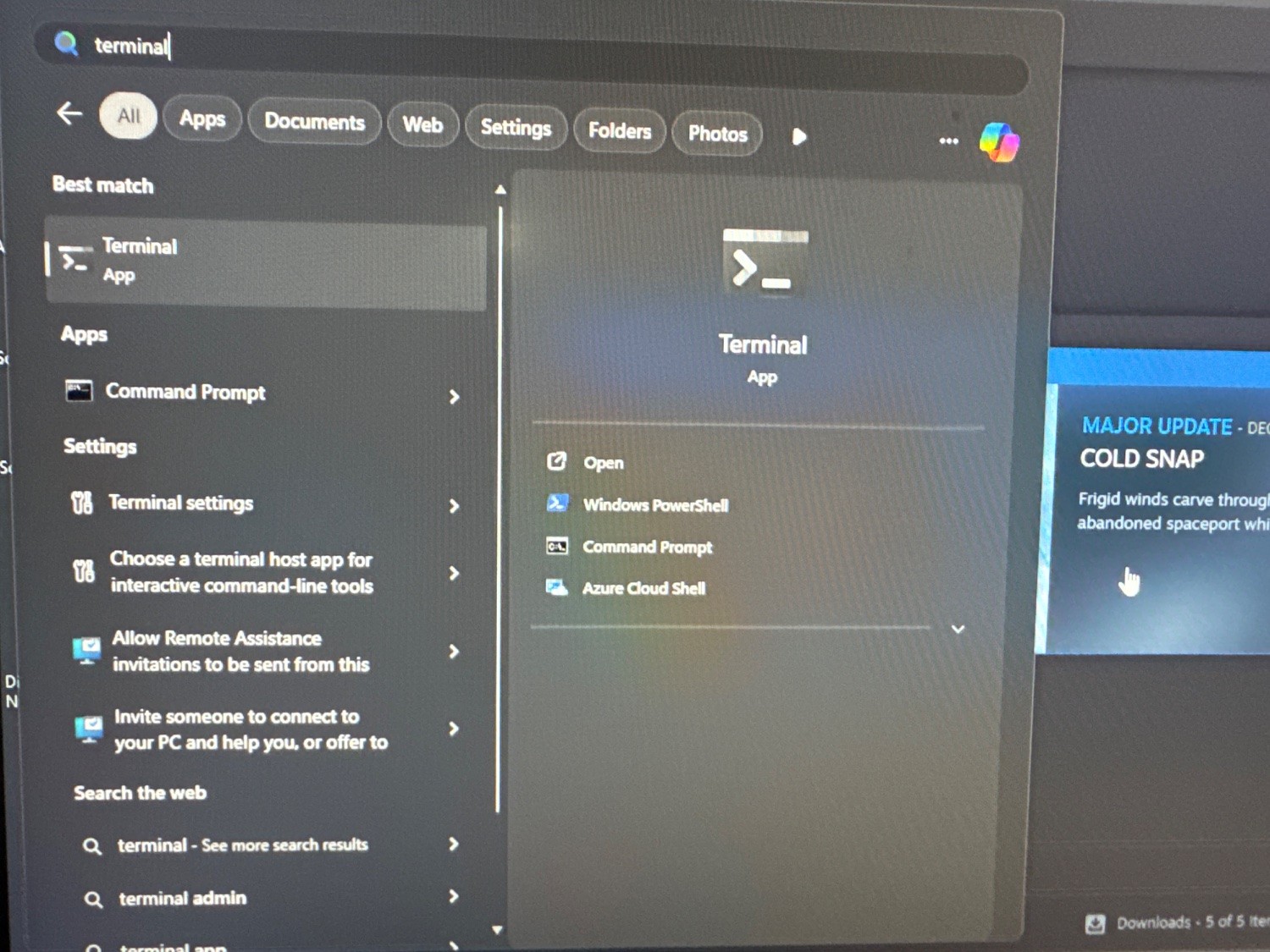
. . . how about that.
All the problems these people bitch about with Windows never happen to me. Maybe it’s because I started with a plain vanilla ISO, no preloaded crap. 🤷🏻♂️
Best part? When I mention that I’m not having these problems I get downvoted.
I’ve definitely had this happen to me on Windows, more than once. I can’t remember what I searched exactly, but I typed it in and hit enter, assuming I’d get the installed app with whatever name I typed, but instead it opened the browser with some online search results. Very annoying.
I’m sure it can be turned off, and it probably isn’t as common as it’s portrayed online, but it does happen, and honestly… It should never happen. The start menu is not the place for generic Internet searching. Period.
I have to use Windows at work and it’s inconsistent. Sometimes I can do a search in the start menu and it’ll immediately pop up with exactly what I was searching for. Other times I’ll get something like the OP shows. And other times it just returns nonsense results. I don’t get it.
This is the same kind of response when someone denies global warming/climate change because they looked outside and the weather around them appears normal.
That’s a pretty wild stretch.
It’s a like for like comparison, although I guess mine was done in 2026 so the meme is outdated.
So in other words, Microsoft saw the backlash specifically about searching “terminal”, so they fixed that one specific bug.
Yes. They cared so much about memes like this that they fixed one bespoke search term.
They’re in a massive PR situation with Windows 10 eol, and clearly an issue with tons of people doing literally everything they can do not switch. Social media is full of people complaining about it, and this goes viral. A simple tweak to the update they were going to put out anyway, and now it cannot be reproduced, so the people who were complaining look like liars.
Is it really that difficult to believe?
I just want to make sure you’re asserting that they went in and hardcoded it so that “terminal” pulls this up?
VS a more realistic “people complained about search and it’s been improved”
Or the real scenario: it’s a meme joke that doesn’t factually represent real life but is instead supposed to by hyperbole.
The techno-tribes asserting nefarious intent for the other techno-tribes is so so so very human.
My brother, does your keyboard not have a Print Screen key on it?
I don’t use Lemmy or Piefed on that computer.
It’s just for playing games. No other activity.
I believe the claim that Windows search is “indeterminate”, and won’t give the same answer each time. I’ve had things I’ve tried that turned out like that.
Doesn’t this just prove that the search is inconsistent though… Unless you’re claiming the original screenshot is photoshopped/faked?
The inconsistencies in the win 11 search as well as the forced advertisements on a device that I not only own, but also built is ultimately what pushed me away from windows on all my devices. I don’t need a search bar that gets confused because it also needs to serve ads that are relevant to my telemetry they’ve collected, just find what I’m looking for and return it.
But equally I’m an engineer by trade, so learning a new OS isn’t a daunting prospect for me, I can fully appreciate that these are issues that wouldnt bother everyone/aren’t significant enough for people to want to make a change.
My claim is that the picture above is a fluke and what it may have been and it has since been improved.
The meme can be accurate, as were now in 2026 and not 2025 so it may have been fixed.
Obligatory “If they choose the ‘Netflix Quick Picks’ route, at least they should recommend ‘The Terminal’ starring Tom Hanks!”
So, we moving to Linux?
I like debian, cause its old and boring like me.
I like Devuan, because Debian went to the dark side.
How do you feel about Linux Mint Debian Edition?
as a linux user (so, genetically superior in every way) i do not have this issue. hahaha…ah.
… sudo app install … a friend?
flatpak install companion.app 🥲
sudo app install … a friend?
sudo apt install fortune
just run that once in a while for jokes. feed it into espeak if you want it to talk to you
EDIT : ‘fortune | tee /dev/tty | espeak’
I just tried this and the terminal app is the first thing to show up.
Shhhh… that doesn’t fit the narrative.
Love how this is what the world’s talented and well paid humans are making.
Talented in what
Thankfully, there are easy to access and use tools to completely rid yourself of the bullshit, ads, and telemetry within Windows.

Mine too:

FYI, you don’t have to use any third party tools and I didn’t, either. Step 1 is to run the Enterprise LTSC IoT version of Windows (either 10 or 11). The consumer versions of Windows are extra bullshit, as we all know by now.
Remove the Windows Store via Powershell (you probably have to run as an administrator):
Get-AppxPackage -allusers *WindowsStore* | Remove-AppxpackageThat removes the store suggestions. It also removes the store entirely, as well as the ability to install store apps. Obviously don’t do this if you are one of the 0.1% of users who actually use the Windows Store for some twisted reason.
Then in gpedit.msc / Group Policy Editor:
Local Computer Policy \ Computer Configuration \ Administrative Templates \ Windows Components \ Search
- Allow Cloud Search → Disabled
- Allow Cortana → Disalbed
- Allow Search Highlights → Disabled
- Do Not Allow Web Search → Enabled (gets rid of the internet search)
- Don’t search the web or display web results in search → Enabled (probably overridden by the above, I set it anyway)
Local Computer Policy \ User Configuration \ Administrative Templates \ Start Menu And Taskbar
- Remove Personalized Website Recommendations From The Start Menu → Enabled
- Do Not Search Internet → Enabled
There are settings for other nags and irritations in here that you may also want to configure to your tastes as well.
Also:
Local Computer Policy \ User Configuration \ Administrative Templates \ Windows Components \ Windows Copilot
- Turn off Windows Copilot → Enabled
This is great advice, but I think we can all agree it absolutely shouldn’t be necessary. All this ad bullshit, store suggestions, Cortana, Copilot, web search, etc. should be opt in, or not exist at all.
But does it revert after an update
No, I’ve never had that happen. Been running it like this for a few years now between two systems.